Posts

web accessibility

Accessibility is something I've wanted to better understand to improve my coding practices for. So I'm taking the Web Accessibility course on Udacity  to learn and improve. The Web Content Accessibility Guidelines (WCAG) by W3C outline 4 Principals of accessibility which are: Perceivable: all users can perceive it; text alternatives for non text content, available in different forms Operable: can all users use it, keyboard support , time adjustable (e.g. slower playback), navigable (focus, link content, titles, bypass, multiple ways) Understandable: can all users understand (language, words, reading level, abbreviation). Consistency: navigation, error prevention & handling & display,  Robust: does it work with all agents including assistive; no html errors, right use of markup  Abbreviated to POUR The WCAG provide a checklist to help identify and improve your apps accessibility. 1. focus focus determines where keyboard event go on the page) and is critical to acce...
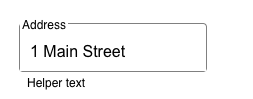
deep dive into Material UI TextField built by mui

Image
The Material Design system is a design system used to create consistent digital experiences across platforms such as android, web and ios. Includes: a color system a typography system a shape system a grid system it addresses motion and lots more Also includes Material Theming which makes it easy to customize Material Design to match your brand. Material Design is not just a set of guidelines it is a whole ecosystem. Material itself stopped maintaining it's react implementation and recommends opensource versions.  A very popular open source implementation is  MUI ,  a react component library  built to implement Material Design . Bills itself as the "worlds most popular React UI framework" and at this time has 1.2M weekly downloads on npm and used by over 750k projects on github (did I mention it's very popular?).  Note: there are other react component libraries implementing bootstrap and ant design for example, so up to you and your design team on what you cho...

reactjs hooks notes

As you learn about hooks, the rabbit hole gets deeper hooks since react 16.8 Hooks rely on JavaScript closures every  function inside the component render (including event handlers, effects, timeouts or API calls inside them) captures the props and state of the render call that defined it. " Whenever we update the state, React calls our component. Each render result “sees” its own state value which is a  constant  inside our function." when you call a setter for a useState then react will call the fn component to run it again, that's a new version of that function with its own closure so a new version of the fn component that is generated with the new state (which is a different state than when the fn was called before) " Inside any particular render, props and state forever stay the same" So too do other functions such as simple handlers and also effects " React synchronizes the DOM according to our current props and state.  There is no distinction between...

build survey 1-10 control in reactjs using radio button groups

Image
  I'm a skier and skied Palisades Tahoe recently. After which they sent me a survey with an interesting survey control as follows: It's a pretty cool ux. We can see it has a:  title a range 0 - 9 laid out as adjacent squares in a row there's a prompt on the left and right of the control to explain lower and upper values hover state when hover over a choice box which shows a blue border when user makes a choice then it shows as a blue circle (same color as borer) and number color is changed (see choice 4 in the screenshot) This is cool, so I built this myself. Here's how I organized the html overall container containing a header, h3 perhaps survey body which contains range start and end prompts list of survey choices which contains for each choice 0 - 9 a survey choice box which contains survey choice css notes: use border-box so the container does not grow when change border on hover use flexbox in a number of places to: layout the row of survey choices and start and en...

github actions

Github actions is a CI/CD platform which github provides. It's free for public projects but private repos (mostly businesses pay). The docs are good and the setup is logical: Events trigger Workflows which execute steps (Jobs) in a Runner (server). Github actions provide a UI to build your workflow, but you can also create as yml file manually. Github Actions has its own tab where you can drill into the logs of a workflow and it's jobs execution. It has a marketplace where you can find and reuse actions. You can run your own bash scripts.  Events can be many types including manually triggered (workflow_dispatch) and scheduled (schedule). See more on events: https://docs.github.com/en/actions/learn-github-actions/events-that-trigger-workflows Nutshell: its a pretty complete offering. I setup a github action to run unit tests on commits to my react app in my repo. My action also can be run manually at any time using the workflow_dispatch event. I also added a rule to my repo to r...

web app security notes

Security principles to live by never trust the frontend; seriously don't trust us! (because frontend can easily be bypassed or attacked) defense in depth; multiple not just 1 security check e.g. 2fa, csrf and same site, client and server checks   principle of least privilege, users lowest set of privileges by default OWASP Top 10 security risks for Web Applications  is a good guide to identifying what risks app builders should be securing again. Injection (including xss) is still in the top 3.  The  OWASP Cheat Sheet  is a good resource too for problems and solutions.  Lets look at some top ones: #1 Broken Access Control; exposure/modification/removal of information by unauthorized users. are access controls consistently applied everywhere needed? e.g. menus vs deep links to pages; apis not consistently enforcing auth checks what if bypass ui controls and hit apis directly? #2 Cryptographic failures ; crypto failures can lead to exposure of sensitive data ...

Domain Driven Design and C4models are complimentary

For me, Domain Driven Design and C4models are very complimentary. Domain Driven Design is about making the commitment to learn the business domain and the language of the business domain and then using models as the means to capture and grow the knowledge. C4models help breakdown the software system(s) and are quite technical: once you get past the Context diagram into Container and Class then it's even more technical. Btw I substitute sequence diagrams for class diagram for Level 4 of c4 and I only create Component diagrams when it's useful. Domain Driven Design uses Entity Relationship models and sequence flows which feed into and inform and also be informed by C4models. There's a nice symbiotic relationship there. I'm a big fan of the C4 Context diagram.  I always like to have "the system on 1 page" view for systems we build.  And at that high level, i t's understandable by all stakeholders including Product and Design and other teams involved.